

Keeping track of insurance premiums, SIPs, subscriptions, and utility bills every month can be challenging. UPI mandates simplify this process by allowing payments to be scheduled and automatically deducted on the due date. Their growing popularity reflects the rapid adoption of digital payments in India.
In fact, UPI transactions surged from just 92 crore in FY 2017-18 to 13,116 crore in FY 2023-24, highlighting the scale and trust users place in the system. This guide explains what a UPI mandate is, how it works, its key benefits, and how you can create, manage, or cancel one with confidence.
TL;DR
-
A UPI mandate is a pre-authorised instruction that allows future or recurring payments to be debited automatically from your bank account.
-
It can be used for one-time payments (such as IPO applications) or recurring payments (such as SIPs, subscriptions, and insurance premiums).
-
UPI mandates help users avoid missed payments while giving businesses more predictable collections.
-
Users can view, modify, pause, or cancel active mandates directly through most UPI apps.
-
Maintaining sufficient balance before the debit date is important to avoid failed payments, service interruptions, or late charges.
What Is a UPI Mandate?
A UPI mandate is a pre-authorised payment instruction that allows money to be automatically debited from your UPI-linked bank account on a future date or at regular intervals. Instead of manually approving every payment, you authorise the transaction once, and the payment is processed according to the terms you have accepted.
When creating a UPI mandate, you approve details such as the amount, payment frequency, start date, and merchant or service provider. The mandate is then linked to your UPI-enabled bank account and authenticated using your UPI PIN. Once approved, the payment can be automatically deducted on the scheduled date without requiring fresh authorisation each time.
UPI mandates can be used for both one-time payments and recurring payments. For example, a one-time mandate may be used to block funds for an IPO application or a future purchase, while recurring mandates are commonly used for insurance premiums, SIP investments, OTT subscriptions, coaching fees, utility bills, and loan EMIs.
Why Do Businesses and Users Use UPI Mandates?
UPI mandates simplify payments for both consumers and businesses by automating future transactions. Instead of remembering due dates or sending repeated payment reminders, both parties benefit from a smoother and more predictable payment experience.
Benefits of UPI Mandates for Users
For individual users, the biggest advantage is convenience. Once a mandate is approved, payments can be processed automatically according to the agreed schedule.
Key benefits include:
-
Fewer missed payments: Recurring expenses such as insurance premiums, SIP contributions, subscription services, and utility bills can be paid on time without manual intervention.
-
Convenience: Users do not need to log in and authorise every payment separately.
-
Timely renewals: Important services and memberships continue without disruption because payments are made as scheduled.
-
Better financial organisation: Knowing when payments will be deducted makes it easier to plan monthly expenses.
Benefits of UPI Mandates for Businesses
Businesses rely on regular cash flow to operate efficiently. UPI mandates help improve payment collection by reducing delays and failed follow-ups.
Key benefits include:
-
Predictable collections: Businesses can better forecast incoming payments from customers.
-
Lower payment delays: Automated debits reduce the chances of customers forgetting due dates.
-
Reduced administrative effort: Fewer reminder calls, emails, and follow-ups are needed.
-
Improved customer retention: Continuous service delivery becomes easier when payments are collected on schedule.
These advantages explain why UPI mandates have become increasingly common across subscriptions, investments, insurance payments, and other recurring transactions. The next step is understanding exactly how a UPI mandate works from creation to payment deduction.
How Does a UPI Mandate Work From Start to Finish?
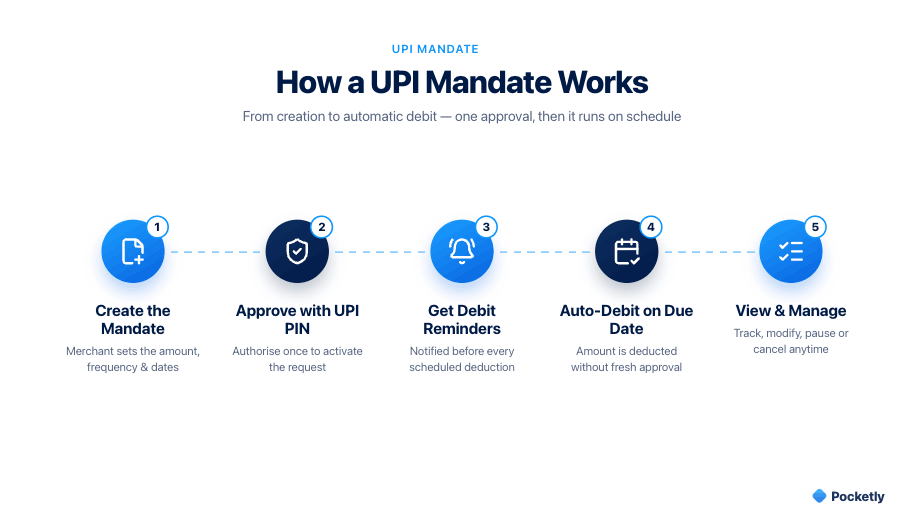
A UPI mandate follows a simple process that allows future payments to be authorised in advance and deducted automatically on the scheduled date. While the exact interface may vary across UPI apps, the overall workflow remains largely the same.
Creating the Mandate
The process begins when a user chooses a service that requires a future or recurring payment. The merchant generates a mandate request containing details such as:
-
Payment amount
-
Frequency (one-time or recurring)
-
Start date
-
End date (if applicable)
-
Merchant name
The user receives this request through their preferred UPI app and can review all the details before proceeding.
Approving With UPI PIN
After reviewing the mandate terms, the user authorises the request using their UPI PIN. This step confirms that the account holder has agreed to the payment instructions.
Before approving, it is important to verify:
-
The merchant's identity
-
The payment amount
-
The debit frequency
-
The validity period of the mandate
Once authenticated, the mandate becomes active and is linked to the user's UPI-enabled bank account.
Receiving Debit Notifications
Before a scheduled debit takes place, users generally receive a notification from their UPI app or payment provider. These alerts serve as a reminder of the upcoming payment and provide an opportunity to review the transaction details.
Notifications help users:
-
Track upcoming deductions
-
Maintain sufficient account balance
-
Identify any unfamiliar payment requests
Automatic Deduction on Due Date
On the scheduled date, the payment is automatically debited from the linked bank account according to the approved mandate. The user does not need to manually authorise the transaction again.
Viewing Active Mandates
Most UPI apps provide a dedicated section where users can view all active mandates. This allows them to monitor upcoming payments and manage recurring commitments effectively.
Typically, users can:
-
Check active and completed mandates
-
Review payment schedules
-
Modify eligible mandates
-
Pause or cancel future payments when permitted
Regularly reviewing active mandates can help prevent unnecessary subscriptions and ensure that only intended payments remain active.
Also read: Understanding Digital Payments: Meaning, Types, and Functions
One-Time vs Recurring UPI Mandates
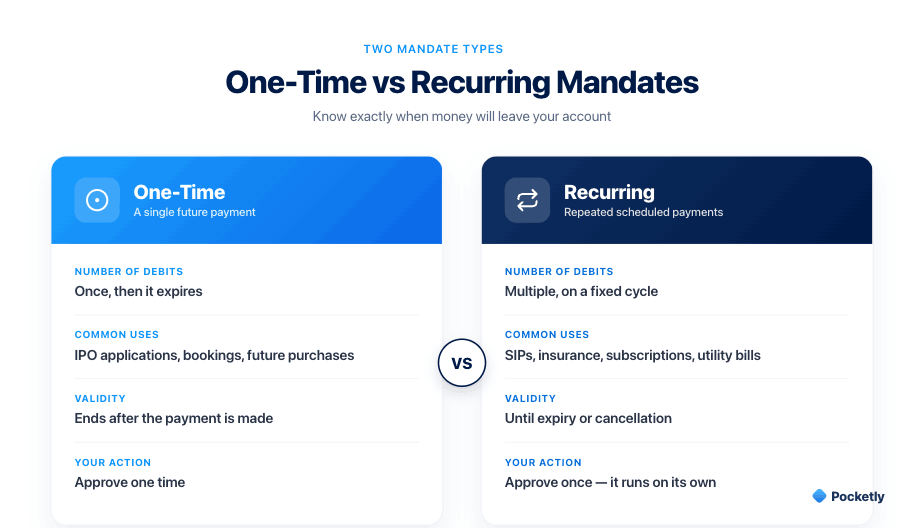
Many users assume that every UPI mandate results in monthly automatic payments. In reality, UPI mandates can be set up either for a single future transaction or for recurring payments over a specified period. Understanding the difference helps you know exactly when money will be debited from your account and avoid unexpected deductions.
What Is a One-Time UPI Mandate?
A one-time UPI mandate authorises a payment that will be processed once on a future date or when a specific event occurs. After the transaction is completed, the mandate automatically expires and no further payments are deducted.
Common examples include:
-
IPO applications: Funds are blocked in your account until share allotment is finalised.
-
Advance bookings: Hotels, travel bookings, or event registrations may require a future payment authorisation.
-
Future purchases: Certain merchants may secure payment approval before completing the transaction.
A one-time mandate is useful when you need to reserve funds for a specific payment without making the immediate transfer.
What Is a Recurring UPI Mandate?
A recurring UPI mandate allows payments to be automatically deducted at regular intervals, such as weekly, monthly, quarterly, or annually. Once approved, payments continue according to the agreed schedule until the mandate expires or is cancelled.
Common examples include:
-
Mutual fund SIPs
-
Insurance premium payments
-
OTT and streaming subscriptions
-
Coaching and educational programme fees
-
Utility bills and membership renewals
Recurring mandates help ensure that important payments are made on time without requiring repeated manual approvals.
One-Time vs Recurring UPI Mandate: Quick Comparison
|
Feature |
One-Time Mandate |
Recurring Mandate |
|
Purpose |
Single future payment |
Repeated scheduled payments |
|
Number of Debits |
One |
Multiple |
|
Common Uses |
IPOs, bookings, future purchases |
SIPs, insurance, subscriptions, fees |
|
Validity |
Ends after payment |
Continues until expiry or cancellation |
|
User Action Required |
One-time approval |
Initial approval only |
What Happens If Your Account Has Insufficient Balance?
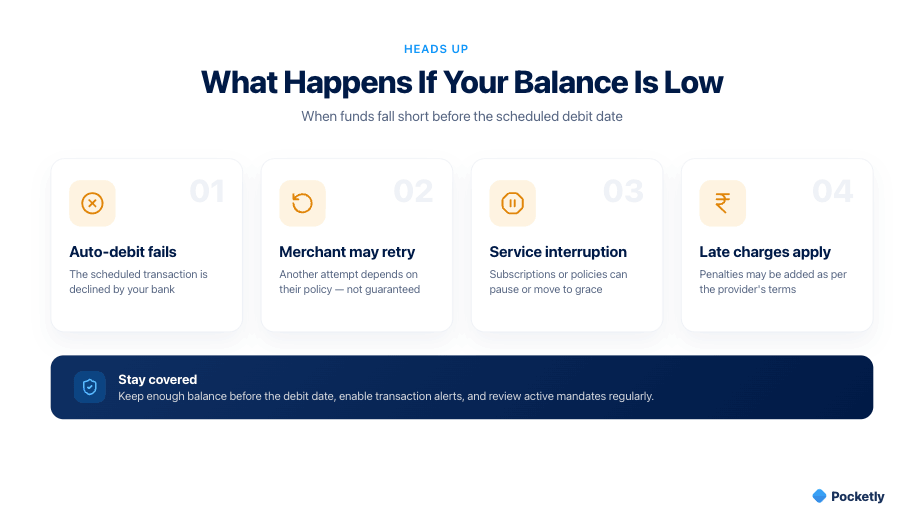
A UPI mandate can only be successfully processed if there are enough funds available in your linked bank account on the scheduled debit date. If the account balance is lower than the authorised amount, the payment may not go through, which can affect the service or obligation tied to that mandate.
The Auto-Debit May Fail
When the payment provider attempts to debit the approved amount and sufficient funds are not available, the transaction may fail. In most cases, you will receive a notification from your bank or UPI app informing you that the debit could not be completed.
The Merchant May Retry the Payment
Some merchants or service providers may make another attempt to collect the payment after the initial failure. The timing and number of retry attempts depend on the merchant's payment policy.
However, a failed debit does not guarantee that another attempt will be made. Users should not rely solely on retries and should review any communication received from the merchant.
Service Interruptions Can Occur
If a recurring payment remains unpaid, the associated service may be suspended, paused, or cancelled. The impact varies depending on the type of payment.
Common examples include:
-
Streaming subscriptions being paused
-
Insurance policies moving into a grace period
-
Coaching or learning platform access being restricted
-
Membership benefits being temporarily suspended
Missing a payment can create inconvenience, especially when the service is essential or time-sensitive.
Late Charges May Apply
Certain service providers may impose late fees, penalties, or additional charges when a scheduled payment is missed. The exact consequences depend on the provider's terms and conditions.
To reduce the risk of failed mandate payments:
-
Keep track of upcoming auto-debit dates
-
Maintain sufficient funds before the due date
-
Enable transaction alerts and notifications
-
Review active mandates regularly to avoid unexpected deductions
Understanding the consequences of insufficient balance is important, but many users also want to know whether UPI mandates are secure. Let's look at the safety features and precautions that help protect these transactions.
How to Check, Modify or Cancel a UPI Mandate
Managing your UPI mandates is just as important as creating them. Most UPI apps let you review upcoming payments, modify mandate details, or cancel future deductions from the mandates section within the app. While menu names may differ across apps, the overall process is generally similar.
Viewing Active Mandates
Regularly reviewing your active mandates helps you stay aware of upcoming payments and identify subscriptions or services you no longer use.
To view your mandates:
-
Open your preferred UPI app.
-
Navigate to the Mandates, AutoPay, or Recurring Payments section.
-
Review the list of active, completed, and expired mandates.
-
Select a specific mandate to view details such as:
-
Merchant name
-
Payment amount
-
Frequency
-
Next debit date
-
Mandate validity period
-
Checking this section periodically can help you avoid unnecessary recurring charges and better plan your monthly expenses.
Pausing a Mandate
Some merchants and UPI apps allow users to temporarily pause a mandate without permanently cancelling it. This option can be useful if you want to suspend payments for a short period while retaining the mandate setup.
A paused mandate typically:
-
Prevents scheduled debits during the pause period
-
Allows future payments to resume later
-
Helps avoid creating a new mandate from scratch
Availability depends on the merchant's policies and the features supported by your UPI application.
Modifying Amount or Frequency
In certain cases, users may be able to update mandate details such as the payment amount, debit frequency, or validity period. However, not all mandates support direct modification.
If changes are permitted, the process generally involves:
-
Selecting the active mandate.
-
Choosing the edit or modify option.
-
Updating the applicable details.
-
Re-authorising the changes using your UPI PIN if required.
If modification is not supported, you may need to cancel the existing mandate and create a new one with the updated terms.
Cancelling a Mandate
If you no longer require a recurring payment arrangement, you can cancel the mandate to prevent future auto-debits.
The typical process is:
-
Open the active mandates section in your UPI app.
-
Select the mandate you wish to stop.
-
Choose Cancel, Revoke, or a similar option.
-
Confirm the request and complete any required authentication.
Once cancellation is successful, future scheduled debits under that mandate will not be processed. It is advisable to verify the cancellation status within the app and keep any confirmation notifications for reference.
Also read: India’s Spending Patterns: From Daily UPI Use to Smart Credit Decisions
Need Help Covering an Essential Payment Before a UPI Auto-Debit?
UPI mandates make recurring payments convenient, but unexpected expenses or temporary cash-flow gaps can sometimes make it difficult to maintain sufficient funds before a scheduled debit. Missing an important payment such as an insurance premium, coaching fee, rent contribution, or subscription renewal could lead to service interruptions or additional charges.
For individuals facing a short-term liquidity gap, a small-ticket loan may help bridge the difference until their next income cycle. Pocketly is a digital lending platform working with RBI-registered NBFCs that provides access to unsecured personal loans designed for short-term financial needs.
-
Loan amounts ranging from ₹1,000 to ₹25,000
-
Interest rates starting from 2% per month
-
Processing fees between 1% and 8%
-
No collateral required
-
Fast digital application process
-
Quick digital KYC verification
-
Loan eligibility and visible credit limits vary by profile
How the Process Works
-
Download the Pocketly app or visit the website
-
Complete the digital KYC process
-
Select the required loan amount
-
Receive approval and funds, subject to eligibility
Conclusion
UPI mandates have become an important part of India's digital payments ecosystem, helping users automate future transactions while maintaining control over payment schedules. Whether used for SIPs, insurance premiums, utility bills, subscriptions, or educational fees, mandates reduce the risk of missed payments and make financial management more convenient.
Before approving any mandate, always review the payment amount, frequency, merchant details, and validity period. Regularly checking your active mandates and maintaining sufficient account balance can help prevent failed debits, service interruptions, and unnecessary charges.
If you're concerned about maintaining enough funds before an important auto-debit, Pocketly can help bridge short-term cash-flow gaps with quick digital loans through its RBI-partnered lending network. Download the Pocketly app today to check your eligibility, complete a simple digital KYC process, and access funds when you need them for essential expenses and upcoming payments.
With the right planning and responsible usage, UPI mandates can help you enjoy the convenience of automated payments while staying in control of your finances.
FAQs
1. Is a UPI mandate safe to use?
Yes, UPI mandates are designed with multiple security measures. Every mandate must be approved using your UPI PIN before it becomes active, and users typically receive notifications before scheduled debits. It is still important to verify the merchant name, payment amount, and mandate validity period before authorising any request.
2. Can I cancel a UPI mandate at any time?
In most cases, yes. You can visit the Mandates, AutoPay, or Recurring Payments section of your UPI app, select the active mandate, and choose the option to cancel or revoke it. Once cancelled successfully, future scheduled debits under that mandate will stop.
3. What happens if I do not have enough balance for a UPI mandate payment?
If your account balance is insufficient on the scheduled debit date, the payment may fail. Depending on the service provider, the payment may be retried later, or the service could be paused, restricted, or cancelled. Some providers may also apply late fees or penalties according to their terms.
4. Can I modify the amount or frequency of an existing UPI mandate?
Some UPI apps and merchants allow users to update mandate details such as the payment amount, frequency, or validity period. If modification is supported, you may need to re-authorise the changes using your UPI PIN. If edits are not allowed, you may need to cancel the existing mandate and create a new one.
5. What is the difference between a UPI mandate and a regular UPI payment?
A regular UPI payment requires manual approval every time you transfer money. A UPI mandate, on the other hand, allows you to pre-authorise a future or recurring payment. Once approved, eligible payments are automatically deducted according to the agreed schedule without requiring fresh authorisation for each transaction.
6. Can a UPI mandate deduct more money than I approved?
No. A UPI mandate can only process payments according to the amount, frequency, and validity period approved during setup. If a merchant wants to change these terms, a new authorisation is generally required.